iOS Recorder · Teleprompter · Dual Cam

Press record. Every angle covered.

CreatorCam is the all-in-one recording studio for creators — a talking-head mode with a built-in teleprompter, dual front + rear camera, and screen recording with a floating face cam. Pick a mode, tap once, and you're rolling.

iPhone · iOS 17+ No account needed Everything stays on device
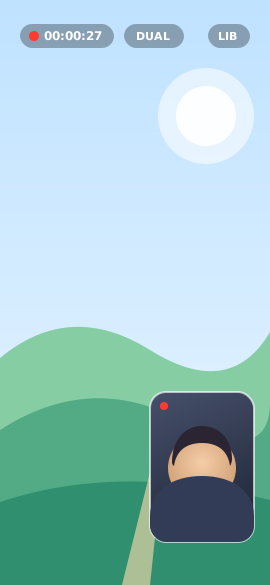
Dual camera mode preview
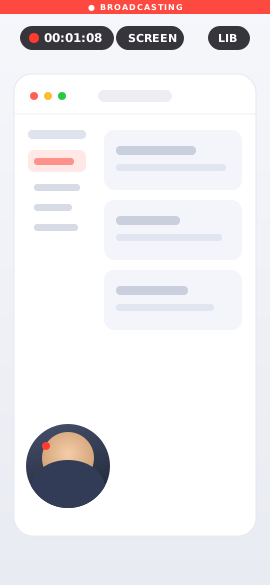
Screen recording mode preview
Front camera with teleprompter preview
Talking-head/ Reaction & POV/ Tutorials & demos/ Course creators/ Social clips
Three capture modes

One app. Every angle.

Switch between three purpose-built recording modes without ever leaving the camera.

01 · Front

Talking-head, with a teleprompter

Records your front camera straight to a clean video file. The teleprompter and on-screen controls never appear in the footage — just you, looking right down the lens.

  • Optional teleprompter, positioned near the lens so your eyes stay on camera
  • Controls and script stay out of the recorded file
  • Crisp microphone audio captured alongside
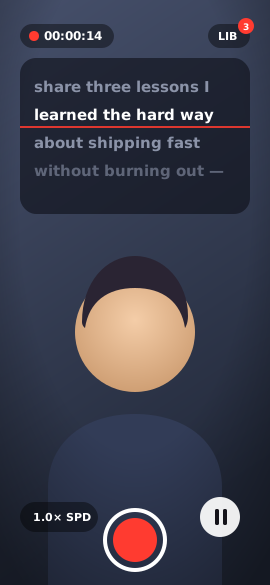
Front camera mode with teleprompter
Dual camera mode with picture-in-picture
02 · Dual

Front + rear, in a single video

Record both cameras at once, composited into one clip — the rear camera full-frame with your face as a picture-in-picture inset in the bottom-right. Perfect for reactions, POV and "show & tell."

  • Frame-synchronized so your face inset stays perfectly in sync
  • Pure camera content — no app UI in the recording
  • One ready-to-share file, no editing required
03 · Screen

Your screen, plus a floating face cam

Capture your screen with the system broadcast extension and a floating face-cam bubble overlaid on top — ideal for tutorials, walkthroughs and product demos.

  • Records system-wide, beyond just the app
  • Floating face cam keeps you in the picture
  • Writes a single, clean microphone audio track
Screen recording mode with floating face cam
Built for creators

Everything in one place

The little things that make recording feel effortless — every day.

Built-in teleprompter

Scroll your script near the lens with adjustable speed, play / pause, and an editor that remembers your words between sessions.

Library, always one tap away

Every clip from every mode lands in one shared Recordings folder, reachable from a top-right button with a live count badge.

Share anywhere

Preview, then send to Files or AirDrop, save straight to Photos, or delete — right from the clip, no extra steps.

Frame-synced dual cam

Front and rear are composited frame-by-frame, so your picture-in-picture inset never drifts out of sync with the action.

Reliable audio

Microphone capture in every mode, with a graceful fallback so a denied mic permission never blocks your recording.

Clean output

What you see on screen isn't what gets recorded — teleprompter text and controls are kept out of every exported file.

Front mode highlight

A teleprompter that keeps your eyes on the lens

Read naturally while looking straight at your audience. The prompter sits in a top band near the camera, with a clear reading-line guide and a backdrop that's easy on the eyes.

  • EDITIn-app script editor — write once, and your script is saved between sessions.
  • SPDAdjustable scroll speed with play / pause, fine-tuned to your pace.
  • RECAuto-scroll on record — hit the button and the words start moving.
  • OFFFully optional — toggle the prompter on or off any time.
REC 00:00:14TELEPROMPTER

Hey everyone — welcome back.

Today I want to share three

lessons I learned the hard way

about shipping fast without

burning out. Let's get into it.

First — protect your mornings.

Second — ship smaller things.

1.0× speed Edit script
How it works

From idea to clip in seconds

STEP 01

Pick a mode

Front, Dual or Screen — choose the angle that fits what you're filming. Add a script if you're using the teleprompter.

STEP 02

Tap record

One tap rolls the camera. In Front mode, the teleprompter starts scrolling automatically so you can read and look natural.

STEP 03

Share from your Library

Find every clip in one place. Preview, save to Photos, or send via Files and AirDrop — ready to post anywhere.

Free to download

Start recording from
every angle today

CreatorCam puts a teleprompter, a dual camera and a screen recorder in your pocket — no account, nothing to set up.